Showing posts with label apps. Show all posts

March 17, 2015

Have You Tried YouTube Kids?

So my son uses my phone. I'm sorry, mom police, but I surrendered to the pressure of being a single mom (don't tell Job), a working mom, and a yaya-less mom altogether. Educational games and kid-friendly YouTube videos became one of my saviors.

Before I became "help-less," meaning when we still had a yaya, my son would very rarely touch a gadget. But now, because it's just my son and me and I'm frequently busy, it's virtually impossible to stop him from using gadgets. So I let him use them provided I'm right beside him and can monitor what he does.

With that shameless admission (please don't judge me), I was so excited when news of a special YouTube app for kids came out called YouTube Kids. I couldn't wait to try it! However, when I checked Play Store, I saw that it wasn't available in the Philippines. Boo.

So I downloaded an APK file instead. Kung gusto, maraming paraan. I successfully installed YouTube Kids on my phone, and here are my observations:

1. The feel and appearance is different from the regular YouTube app.

I initially thought that it would just look and feel the same as regular YouTube, but from the time you open the application, you'll know you're opening a special app for kids.

2. It only has a horizontal orientation.

Which my son likes, but I don't like. Since he's the one using it, it's okay.

3. It has parental controls.

January 12, 2015

Balik Alindog 2015

Hi friends, how was your weekend? Mine was spent entirely at home for some reason. I have separation anxiety na with the mall. Chos.

But I have several stories to tell. Let's begin with my newest journey to lose weight.

I love you, goodbye.

See, I checked the scale and found out I am now more than 10 kilos heavier than I was the year I gave birth. While some women want to have their pre-pregnancy weight back, I want to go back to my post-pregnancy body. I posted this photo during last year's attempt to lose weight and I'm posting it again:
Sorry for the bagong-gising face, but look at those arms. Well, one arm. Oh those arms. I want them back! Haha. Kasi that's the slimmest I've been throughout my adult life. Thank you, breastfeeding! And I'm determined to lose weight again and keep it off - for real this time.

I attempted to lose weight last year. But even if I consistently worked out and ate healthy, I had to stop during the notorious rotational brownouts in the city. We had 7-hour daily brownouts and I just didn't have the energy to work out and diet anymore. That caused my downward spiral.

Hopefully, the situation this year will be different. For example, I'm taking it easy this year. I just started working out last week and I didn't do the 45-minute runs I used to do last year. I think rigorous exercise would only burn me out and I might quit easily.

So what I'm doing now is using this nifty app called Sworkit. I love it. It's nicely designed (important app criterion!) and easy to use. Best of all, it has a wide variety of exercises and I can choose my comfy level. Oo, beginner. Haha!

October 13, 2014

The Snubbed Blogger and Other Stories

My Sunday was a mixture of ups and downs, but thankfully, there were more good things than bad things. But before I talk about it, here's what we wore (hahaha):
Doesn't he look like a fashion blogger? What happened to my 2-year old?
On Mommy: Zara tunic | F21 jeans | CLN shoes
On Baby: Carters shirt | Baby Mossimo jeans | Elle/Chicco shoes

Yes I need to lose weight. Now, about our Sunday, there was only one bad thing, but it almost ruined my day. It was because I was a...

THE SNUBBED BLOGGER

A month ago, I was invited to attend this particular event of a huge company. I said yes. I was even required to wrote a pre-event post as a "partner blogger," the PR person's words, to invite participants.

The venue was an hour away from home. Since we had to go to church first, we had to wake up extra early. Also, we had to plan our day around this event so there were many changes in our usual, comfortable Sunday routine.

To say the event was a disappointment is an understatement.

November 30, 2013

Top 5 Apps I Can't Live Without

Okay, that's a hyperbole. Of course, I can live without these apps. Only I'm not sure if I would want to! My phone is a low-end Android phone (I just have to say low-end), but I enjoy it and make the most out of it. Here are my five most favorite and most used apps:

5. Quick Note

As an impulsive writer and list-taker, a note app is a must-have in my phone. Quick Note must be the nth notetaking app that I've downloaded but so far, it's the best. Surface-wise, it is clean and easy to navigate. The fontface is visually-pleasing and readable. It's also light and doesn't take up too much space in my low-tech Android phone.

What I like here is that I'm able to draft a post in my downtime, while Yuri is sleeping, or before I sleep.

PS: I'm typing out this entry on Quick Note, which I will just share to my Google mail account.


4. Pocket

One of the biggest eaters of my time is reading. Because I work online, I'm very open to temptations of interesting blog posts and articles.

But instead of wasting my time reading, I just click on the Save-to-Pocket plugin of my Chrome browser. It is automatically saved in the Pocket app of my phone. Then, I can read as much as I like before sleeping.

By doing this, I will not miss out on informative and interesting reads without sacrificing worktime. The articles saved inside my Pocket app are usually about the following topics: motherhood and parenting, recipes, budgeting, trivia, and home & living.


3. BPI Express Mobile

I'm a loyal BPI account holder. Even though I only have an ATM account, I like BPI because of the services they offer to make my life more convenient.

For example, I receive my monthly salary via BPI. I can easily check my account using the app. When I need to pay the internet bill, I just transfer the amount using the app. I can also transfer money to other BPI users, which make online shopping hassle-free. To this day, I only buy stuff from sellers who have BPI accounts! (I learned my lesson when I got scammed.)


2. MoBill Budget

October 19, 2013

Digital Reading Ba Kamo?

I read a post on Twitter a while back saying that if it weren't for Twitter, we would all be sleeping 4 hours earlier.

I beg to disagree. While I am an avid tweeter, it doesn't really take much of my time. Scroll down lang ng scroll down, retweet, reply, favorite. It doesn't take an hour. Now, what takes much of my time is digital reading. If it weren't for digital readers and apps, I would be sleeping, maybe, 6 hours earlier!

I have three main reading apps: Kindle, Zinio, and Pocket. Actually, the Zinio app is not compatible to my current phone (must.buy.iPad.), so I do the reading of the magazines on my laptop. Meanwhile, the other two apps are in my phone, which contributes to my lack of sleep for the past months. Whew!

(And that's beside Instagram ha.)

Here are some screenshots of the apps, which I took months ago. This means there are four times more content now. Sigh. I am hopeless. By the way, these are the screenshots of the computer counterparts of the apps because, well, they look better than the ones in my phone haha!


My Kindle Library

Priceless finds: Thanks to social media (I forgot which one specifically), I was able to score free books from Filipino writers. Months and months ago, I visited Dennis Sy's website and found out he's offering the Kindle version of his book, Rich for Life, for free! Of course, given my avid interest in all things personal finance and God's part in it, I immediately took advantage of the offer!

Months later, I think I found out from Twitter that Rose Fausto's book, Raising Pinoy Boys, for free! Also on Kindle! Gah, I was so elated because I know I need that book. Obviously, I went to Amazon right away to purchase. Trust me: it's one of the best books any Filipino mom should read.

PS: All of the books in my library are *whispers* freeeee.


My Zinio Reading List

I totally depend on Zinio for my magazine consumption. Not that I am addicted to magazines. I only read through magazines for additional information, so I don't really feel the need to subscribe to one. Nevertheless, occasionally, Zinio sends a $5 coupon (do you receive these coupons, too?) to my email, so who am I not to take advantage? Of course, Smart Parenting and Good Housekeeping are two of my top picks.

Priceless find: Smart Parenting Yaya Manual! I've been looking for one forever, and finding a digital copy at Zinio finally ended my search. Plus, since I used a coupon to purchase it, it's totally fuh-ree!


Aside from Kindle and Zinio, my regular reading app would be Pocket. No, you don't need to purchase any book or magazine on this one. Instead, this is where the blog posts and articles that I don't have time to read during the day go. When working, I would inevitably come across an interesting post that seems to long. Solution? Save to Pocket! Of course, I also have the Chrome extension to get this to work!

No priceless find here since everything naman is just downloaded for free. But looking at the screenshot above, now you know where I save the recipes I discover! :-)

How about you? What are your reading apps? What apps are you addicted to?

_________________________________________________________________
Do you like this post? Never miss out again when you click on the cute bunny below:

rss_bunny

Or by entering your email here:
Enter your email address:


Delivered by FeedBurner

You can also follow me on Twitter, Instagram, and Pinterest for daily updates on my mundane musings.

May 20, 2013

Bring The Music Mania To Your Kid's Childhood!

J and I have always been into music. Well, who isn't, right? And we all know how music brings a lot of benefits, from supposedly making our kids more intelligent to even lifting up our moods. This is why we also want Y to be a music-lover when he grows up.

We used to rely on old-school musical instruments (and yes, cassette tapes) to listen to music. I also remember how my mom used to buy me music books to help me learn about music. But these books can be quite boring, no

But never fear, mommy. What is great is that there are now cute and cool apps that will make music much more interesting to learn. I'm talking about this new app - Maddie and Matt's Music Mania. Please keep reading below for further information. :-)

________

Music is very integral to a kid's learning. Music allows kids to mentally and emotionally develop their artistic skills through the words and symphony that they use and hear. Kids use music sometimes to express themselves and allow other people to see through their abilities. Music can benefit kids in other ways that will definitely contribute to their growth. For one, music enhances a kid's listening and language skills because it forces them to concentrate. Even the different tempos when listening to a song help exercise the minds of kids.

This fact enables them to improve their auditory development and their skills. What's better is that music even boosts a child's self-esteem because they are free to do what they want and how they want to do it. It permits them to explore different melodies and find peers who share the same passion for singing and for playing musical instruments as them.

We often witness kids who have a fondness for listening to pop music early in their childhood, and it might be a really good thing. Kids these days listen to Taylor Swift or One Direction because they're relatable and because those melodies fit their fresh excitement. When kids look up to their idols, they want to imitate their idols' hobbies as much as possible. So if your kid listens to Taylor Swift countless of times in a single day and she suddenly wants a guitar, allow her to probe into this new, enjoyable hobby because it might work to her advantage. This might encourage your child to show her newfound talent at school and give you the pride that any parent will want from her kid. I think it is quite obvious that music can also serve as a sign that your kid is basking in a very sunny disposition.

AppLabs Digital Studios Inc. (ADSI) knows how important music is to kids and to their growth. This is the reason why the latest addition to their growing Maddie and Matt series features the app nation's brightest kids in a bevy of educational and fun musical instruments. Maddie and Matt's Music Mania is the recent educational app from ADSI which aims to teach kids basic knowledge about different musical instruments. Not only kids can learn about an instrument's history and trivia, they can also try to play with the instrument and compose beautiful rhythms that will forever be gold in a world of a kid.


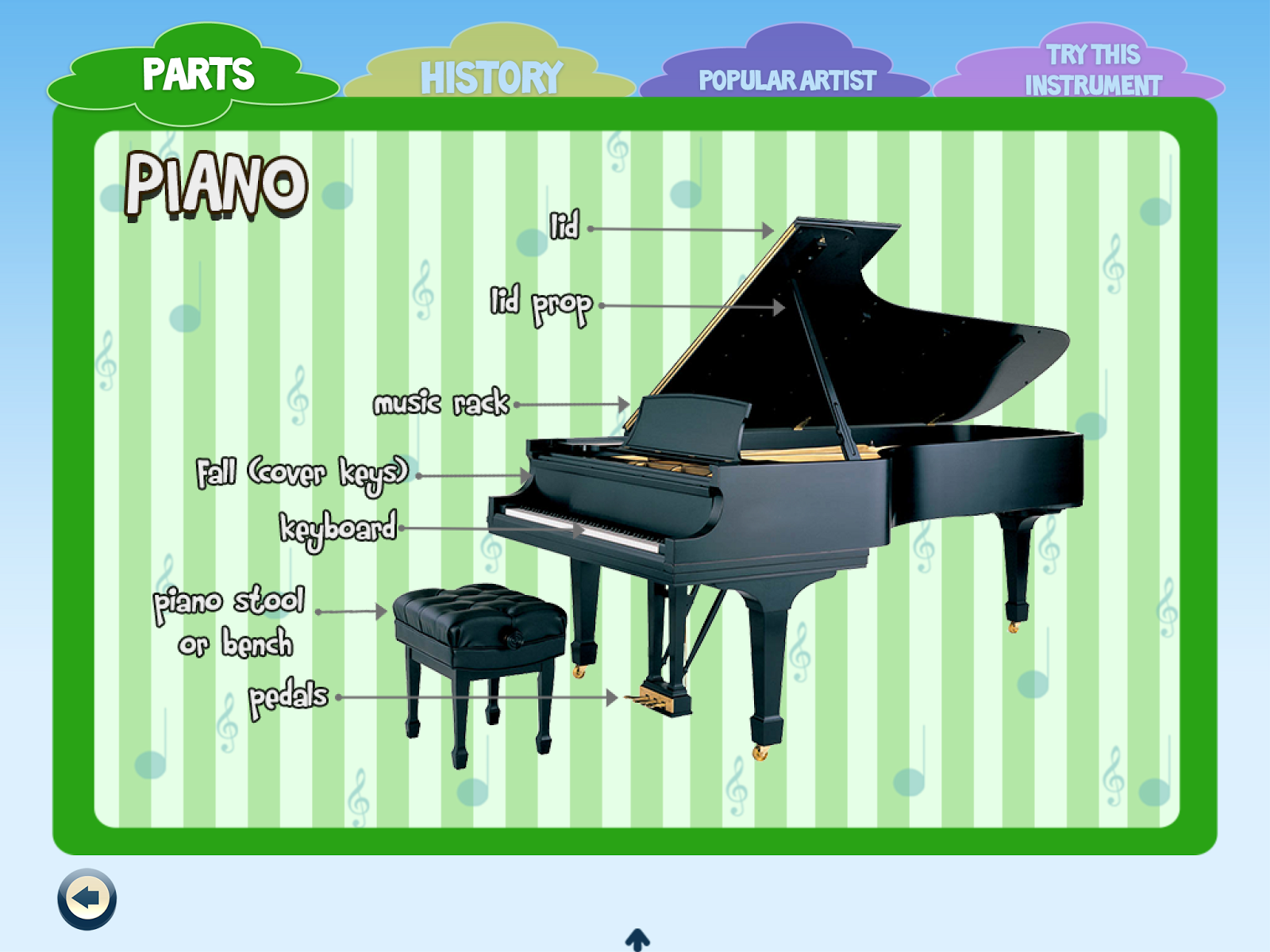
Music Mania is a free app that offers trials for a number of instruments. Kids can try playing the acoustic guitar, classical piano, and harmonica if they want to. Users can buy in-app purchases if they want to get their hands into other instruments such as bongos, electric guitar, and the violin. Kids will find a greater joy once they start learning about the classical and advanced musical instruments in the in-app purchases.


Allow your kids to be challenged in Music Mania's Quiz and let them guess the right answers for each question about music. When your kids are done with their guitar and piano lessons, they can share their Music Mania experience on Facebook and encourage other kids to try the app!


This educational app hopes to educate kids and inform them about the legends and icons who have been known to use specific musical instruments. This will inspire them to unleash their inner musician with the help of the musical wonders from Maddie and Matt!


Links:

Maddie and Matt's Music Mania - http://maddieandmatt.com/music-mania.html


AppLabs Digital Studios Inc. - http://www.applabsdigital.com/


Disclaimer: This is a sponsored post. Content and photos are from AppLabs Digital Studios, Inc.
_________________________________________________________________
Do you like this post? Never miss out again when you click on the cute bunny below:

rss_bunny

Or by entering your email here:
Enter your email address:


Delivered by FeedBurner

You can also follow me on Twitter, Instagram, and Pinterest for daily updates on my mundane musings.

April 16, 2013

Picture Collage Maker: Your New Go-To Photo App

It's summer, that time of the year when work and studies take a backseat and leisure goes shotgun. Well, for some of us. But even though we have to work, I'm sure we have taken a few weekends off already to go someplace else. Surely, we have created memories for the summer, didn't we? What's the better way to store these memories than photos?

Even better are collages, where we can showcase all our photos at once. I am, in fact, a fan of making collages for my blog posts because readers can see every photo without waiting forever for each one of them to load. So I am always on the lookout for new collage makers, when I discovered this one: Picture Collage Maker.


(Press Release)

Picture Collage Maker


PearlMountain Technology is pleased to release the update of Picture Collage Maker for Mac 1.8.8 which comes with a long list of new features compared with previous versions.

PearlMountain Technology, a creative software company, announced the release of the Picture Collage Maker for Mac 1.8.8. Picture Collage Maker for Mac 1.8.8 is the latest version of PearlMountain’s flagship app, Picture Collage Maker for Mac. The user-friendly and flexible app on Mac OS X creates personalized photo collages quickly and easily with various options for sharing via email and social media.

The Picture Collage Maker for Mac 1.8.8 update provides over 140 deluxe templates and powerful editing functions to create personalized calendars, photo collages, greeting cards, scrapbooks, posters, photo albums, and more. The combinations are limitless to how photos can be shared with others.

Additionally, Picture Collage Maker for Mac 1.8.8 boasts an improved and more user-friendly GUI that enables a seamless creating process. Background and size settings are combined on a single panel to get an easier and instant preview. The newly added floating toolbar helps to edit properties of each object more conveniently.

The management of custom sizes is greatly improved in version 1.8.8. In addition to choosing predefined sizes, users can customize collage sizes with “Manage Custom Sizes” feature. New customized sizes are saved automatically for future use.

On top of the above new features, Picture Collage Maker for Mac 1.8.8 has features to better export and print images. The new “auto adjust orientation” feature automatically adjusts the photo collage to a PDF sized file. Version 1.8.8 also allows for transparent background for PNG exporting. For printing, version 1.8.8 offers a “fit to page” option to instantly fit the collage to a specified paper size.

To expand options and creativity, Picture Collage Maker for Mac 1.8.8 has added a large number of fascinating and unique templates to choose from. Version 1.8.8 also supports new languages of German, Japanese, and Traditional Chinese in addition to English and Simplified Chinese found in previous versions. These language additions extend the availability of Picture Collage Maker for Mac to a variety of new users.

The abundance of new features and additions to Picture Collage Maker for Mac 1.8.8 has not lessened the software’s ease of use. Creators and users of all types will find things to love with this collage app as the New Year moves forward.

Screenshots:


Pricing and Availability

Picture Collage Maker for Mac 1.8.8 supports Mac OS X 10.6 or later and is fully compatible with Mac OS X 10.8 (Mountain Lion). A single-user license costs 19.90 USD. Further information of the product and the free Lite version can be found at the product page.

Links:
Product page: http://www.pearlmountainsoft.com/picture-collage-maker-mac/
Mac App Store page: https://itunes.apple.com/us/app/picture-collage-maker/id495631432?mt=12

Company
PearlMountain Technology Co., Ltd is a dedicated graphics software developing company founded in 2006. Over the past 7 years, it has released products enjoying great popularity among worldwide users like Picture Collage Maker, CollageIt and PearlMountain Image Converter etc. Its products have already been well received all through North America, Europe and Asia software markets for their ease of use, reliability and superior performance. Further information about the company and its products is available at http://www.pearlmountainsoft.com/.

Contact:
David Lin
PearlMountain Technology Co., Ltd
CEO
Email: info@pearlmountainsoft.com

Disclaimer: This is a sponsored post.
_________________________________________________________________
Do you like this post? Never miss out again when you click on the elegant chair below:


Or by entering your email here:
Enter your email address:


Delivered by FeedBurner

You can also follow me on Twitter, Instagram, and Pinterest for daily updates on my mundane musings.

February 25, 2013

Help Save Green Sea Turtles Through EnviroPop App


Happy Monday, everyone! It's the start of the week, and for the workers and employees among us, it means the start of a new work week. Happy are those who are students and work in schools kasi walang pasok ngayon. Haha! But still, begin your week with good vibes!

Better yet, begin your week with a new advocacy. I'm pretty sure most of you have access to smartphones. Some of you may even have iPhones (lucky!). If you have the latter or any Apple device, I have a proposition to make. Check this post out and start advocating for Mother Nature in a fun and easy way - by using the EnviroPop App!

Cute!
Below is a guest post from AppLabs Digital Studios

Background:

The Green Sea Turtles, famously known as Pawikan to Filipinos, are one of the most endangered marine animals in the Philippines. Not only do people catch this specific Chelonian breed for exotic soups or stew, they also slaughter the poor creature so they can turn the turtle hide into a shoe, belt, and other accessories. The idea of killing helpless marine creature for the sake of people's own frivolous gratification is just depressing.

Pattie the Pawikan

The current state of our marine biodiversity is facing serious threat not only because of man's shallow desires, but also because of the chemicals brought by man to their habitat that is the sea. PET bottles and metals like mercury or cadmium pollute the ocean which the turtles obtain when they are passing through different straits. These factors harm the green sea turtles and make their class vulnerable.

World Wide Fund for Nature (WWF-Philippines) has several programs lined up which hopes to conserve the marine biodiversity and to stop endangered species from facing extinction. One of their innovative program comes in the form of an environmental application called EnviroPop. With the help from app development company AppLabs Digital Studios Inc., WWF-Philippines will be able to collect the funds that they need through app downloads and the imparted environmental awareness to users.

EnviroPop

EnviroPop is a puzzle game which features several marine animals like Pattie the Pawikan, Bobby the Butanding, and Dolly the Dolphin. The gameplay is to remove the harmful marine pollutants by tapping and swiping it away from the screen altogether. Players are given one minute to eliminate as many hazards as possible and eventually save the sea creatures.

EnviroPop also has an “Enviropedia” feature which contains facts about the endangered sea creatures and the pollutants that threaten them. Through Enviropedia, people will be informed about WWF-Philippines priorities when it comes to marine conservation. EnviroPop costs $0.99 only, and for every download of the app, profits will find its way into WWF-Philippines' marine conservation program. The app allows users to be entertained and contribute to a good cause as well.

It's time that we finally address the problems occurring in our treasured marine ecosystem. Download EnviroPop and be a part of this charitable, environmental campaign while there's still time.

Download the app here:
Full version
Lite version

More screencaps:


Know more about the app through these links: EnviroPop App and AppLabs Digital Studios Inc. Also visit WWF-Philippines for more information.


Download the app here:
Full version
Lite version

Related Posts Plugin for WordPress, Blogger...